
LG TV media player: webOS 2020+ support and how Alpa Player fits
Short answer: LG TVs run webOS, not Android, so APK files cannot be installed and apps come from the LG Content Store. Alpa Player, a free media player from Alpa Yazılım, supports LG TVs with webOS 2020 and later. The store version is in the review process and coming soon. Until then you can use a USB drive, screen sharing from a phone or a device plugged into HDMI.
Key takeaways
- LG TVs run webOS, so Android APK files will not install; apps come from the LG Content Store.
- Alpa Player supports webOS 2020 and later LG TVs; the store version is in the review process and coming soon.
- 2020 models launched with webOS 5.0, and you can check your version under About This TV in the settings.
- While you wait, a USB drive, screen sharing or an Android TV box on HDMI works well.
- You can send a list to the TV from a phone or computer using the MAC address and a 6-digit key, with no typing on the remote.
If you want an LG webOS media player, start with one fact: LG smart TVs run an operating system called webOS rather than Android. That is why the APK files you use on Android phones and Android TV devices will not install on an LG TV, and why apps arrive through the LG Content Store. This guide covers what your LG TV can play today, where the free Alpa Player (developed by Alpa Yazılım) stands on webOS 2020 and later models, and what to do until the store version is released.
What operating system do LG TVs use?
webOS is the Linux-based operating system LG uses on its smart TVs, and LG has shipped it on TVs since 2014. LG TV apps are generally built with web technologies and distributed through the LG Content Store; developers can read about it on the LG webOS TV developer site.
The home screen has a launcher bar along the bottom where your apps are lined up, and you can reorder them. Three things matter for you as a viewer: Android apps do not run, you are limited to what the store offers, and the age of your TV decides which webOS version, and therefore which apps, it can run.
Can you install an APK on an LG TV?
No, you cannot install an APK on an LG TV, because an APK is an Android app package and webOS does not run it. Do not trust files circulating online as "APK for LG TV"; they are either unsuitable for your device or potentially harmful. LG does offer a developer mode on its TVs, but it is meant for development and not for everyday use.
APK installation belongs to Android-based devices, and how to install an APK on Android TV explains the safe way to do it. For an LG TV, the right route is the LG Content Store.
Which LG TV models will Alpa Player work on?
Alpa Player is a free media player developed by Alpa Yazılım and supports LG TVs with webOS 2020 and later; its LG store version is in the review process and coming soon. You can follow the current status in the free Alpa Player download section.
LG launched its 2020 models with webOS 5.0, and the version numbers have climbed since. The table sums up where your TV stands by age.
| Model year | webOS version | App status |
|---|---|---|
| 2019 and earlier | webOS 4.5 and older | Outside the supported range. |
| 2020 | webOS 5.0 | Supported; store version coming soon. |
| 2021 | webOS 6.0 | Supported; store version coming soon. |
| 2022 and later | webOS 22, 23, 24, 25 and newer | Supported; store version coming soon. |
To see your own TV's version, open Settings with the remote, go to All Settings, then General, and choose About This TV. Menu names vary a little by year and model. You can also find the model year on the box, in the manual or on LG's support page.
How can you watch your videos on an LG TV until the store version arrives?
Until the store version is out, you can watch your videos on an LG TV from a USB drive, through screen sharing, with a device on HDMI or with other players in the LG Content Store. The table compares the options.
| Method | What you need | Strength | Limit |
|---|---|---|---|
| USB drive and the TV's built-in player | A USB drive with your files | No extra app needed. | Supported formats vary by model; check the manual. |
| Screen sharing from a phone | The same Wi-Fi network | Quick and needs no setup. | Quality and stability depend on the phone and network. |
| Android TV box or stick on HDMI | An Android TV device | You can install the Android APK today. | Needs an extra device and remote. |
| Windows computer on HDMI | An HDMI cable and a computer | The Windows installer is downloadable today. | The computer has to sit near the TV. |
| Other players in the LG Content Store | LG's app store | Apps such as Plex open your own library. | Each app supports different sources. |
If you are shopping for something to plug into HDMI, see the Android TV box buying guide; for the computer route, read free media player for Windows. A Fire TV stick is another option, covered in Fire TV Stick media player.
How will Alpa Player be installed on an LG TV?
Once the store version is live, installing it will work like installing any other LG TV app: you will find it in the LG Content Store and install it. The steps below describe the expected flow; store menu names may differ by model.
- Connect the TV to the internet and open the LG Content Store from the launcher bar.
- Search for "Alpa Player" and select the app.
- Press Install, then open the app from the launcher bar when it finishes.
- On the Add Source screen (Kaynak Ekle in the app), open the MAC tab and note the MAC address and 6-digit key.
- On a phone or computer, open the remote upload page and add your source.
Until the release, check the download section rather than searching the store. For a general introduction, read what is Alpa Player.
How do you add a playlist on an LG TV without typing?
Typing a long address with an on-screen keyboard is tedious on an LG TV even with the Magic Remote's pointer, so upload the list remotely from a phone or computer instead. On the app's Add Source screen, the MAC tab shows the TV's MAC address and a 6-digit device key.
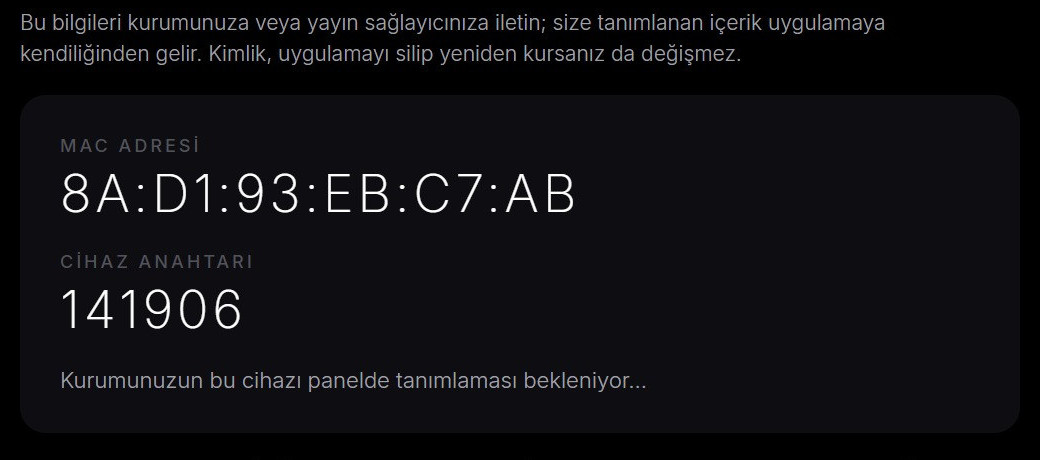
You enter both values on the remote playlist upload page, add your server account or M3U address and confirm the responsibility statement; the list arrives on the TV. The address and password are not shown in the app. You are the one who performs the upload, and every upload is recorded with your IP and MAC address, so add only sources you have the right to use. The step-by-step version is upload a playlist to your TV, and find your TV's MAC address explains what the MAC address is.
How do you get better picture quality on an LG TV?
On an LG TV, picture quality is shaped mostly by the source quality, your connection speed and the TV's picture settings; the player is one link in that chain. Checking these points usually covers it:
- Connection: a stable 15-25 Mbps is the usual recommendation for 4K, and a wired link is more predictable. See internet speed for streaming.
- HDR and 4K: which HDR formats your TV supports depends on the model; 4K HDR playback explains the terms.
- Picture mode: many LG models offer cinema or Filmmaker Mode, which you can try for movies. More in home theater setup tips.
- Sound: a soundbar can introduce delay; fixes are in audio out of sync.
- Codec: H.264 plays almost everywhere, while H.265 and AV1 support depends on the TV's age. See H.264, HEVC and AV1 compared.
How do you troubleshoot playback problems on an LG TV?
The fastest way to troubleshoot is to work out whether the problem sits in the source, the connection or the TV. Try these in order:
- Open the same video on a phone or computer to confirm the file is fine.
- Switch the TV to a wired connection or use the 5 GHz Wi-Fi band; see Wi-Fi vs Ethernet for streaming.
- If an MKV will not open from USB, convert it to an MP4 with H.264 video and AAC audio, or follow how to open MKV files.
- Power the TV off completely and turn it on again after a few minutes.
- If the issue continues, use the checklist in fix video buffering.
How do you keep LG TV playback legal and safe?
Install apps only from the LG Content Store and play only sources you have the right to use. The app provides no content; it plays the source the user adds. Addresses and passwords you add are kept encrypted with AES-256 in the device's secure storage, never shown on screen and never sent to Alpa Yazılım.
The point that player software is legal while responsibility lies with the content is explained in are media player apps legal. If you would like to see the app in a browser first, the Alpa Player web demo runs on open-license samples, and the legal notice has the details.
Step by step: Prepare Alpa Player on an LG TV and add your first source
- Under Settings, All Settings, General, About This TV, check your webOS version.
- Check the LG store status of Alpa Player in the download section at alpaplayer.com.
- When the version is live, search for Alpa Player in the LG Content Store and install it.
- Open the app, select the MAC tab on the Add Source screen and note the MAC address and the 6-digit key.
- On a phone or computer, open the remote upload page and enter those values.
- Add a source you have the right to use and confirm the responsibility statement; the list appears on your TV.
Frequently asked questions
Can I use Alpa Player on an LG TV?
Alpa Player supports LG TVs with webOS 2020 and later. The store version is in the review process and listed as coming soon, and you can follow it in the download section. Meanwhile you can use the app through an Android TV box or a Windows computer on HDMI.
Can I install an APK file on an LG TV?
No. LG TVs run webOS rather than Android, and an APK is an Android app package that webOS cannot run. The right way to add apps to an LG TV is the LG Content Store.
How do I know whether my LG TV has webOS 2020 or later?
Open Settings, go to All Settings, then General, and choose About This TV; the webOS version appears there. LG's 2020 models launched with webOS 5.0. Menu names can vary by year and model, and you can also find the model year on the box or in the manual.
Will Alpa Player be free on LG TV?
Yes. Alpa Player has no account requirement, subscription or purchase, and it is a non-profit project by Alpa Yazılım. The app has no ready-made channels, movies, shows or playlists.
Do I have to type the address with the LG remote?
No. Enter the MAC address and 6-digit key shown on the MAC tab of the Add Source screen on the remote upload page, and add your list from a phone or computer. The address and password are not displayed on the TV.
What if a video on a USB drive will not play on my LG TV?
First confirm the file opens on another device. Then compare its format and audio codec with the supported-format list in the TV manual; an MP4 with H.264 video and AAC audio is usually the safest choice. If that fails, play it from a device connected to HDMI.
Sources
Related articles
 Device guides
Media Player for Android TV: How to Choose
Looking for a media player for Android TV? See what to look for, compare popular options and set up Alpa Player, a free app built for the remote.
 Device guides
Samsung Smart TV Media Player: Options for 2026
Need a Samsung smart TV media player? Learn how Tizen apps work, which models Alpa Player supports and how to watch your own videos today.
 Device guides
Fire TV Stick Media Player: Safe Setup Guide
Choosing a Fire TV Stick media player? Compare options, see how Alpa Player supports Fire TV, check the Appstore status and install apps safely.