
Are media player apps legal? Software versus content explained
Short answer: Media player software is legal. Apps such as VLC, Kodi, or Alpa Player simply display whatever source they are given, and legal responsibility begins with whether the content played is licensed. Alpa Player supplies, sells, and hosts no content; users add only sources they have the right to use, and every upload made through the website is logged with the IP and MAC address.
Key takeaways
- Player software is legal; showing a video file or stream address on screen is not unlawful in itself.
- Responsibility is shared: the content provider must be licensed, the player developer must describe the software honestly, and the user answers for the source they add.
- An app that promises ready-made channels and lists behaves like a streaming service, not a player, and raises a licensing question.
- Alpa Player provides no content; users add only sources they have the right to use.
- Every remote upload made through the website is logged with the IP and MAC address, and the uploading user is responsible.
Are media player apps legal? Yes. A player is software that shows a video, audio file, or stream on your screen, and writing or using such software is not against the law, in the same way that owning a web browser or a loudspeaker is not. The legal question starts with what you play through it.
In this guide we separate the roles of the player, the content provider, and the user, and explain how to tell whether an app is really a player or a streaming service in disguise. Alpa Player, built by Alpa Yazılım, is a free media player and spells out this split of responsibility openly. This article is not legal advice.
What is a media player and what does it do?
A media player is software that reads and decodes a video or audio source and presents it on your screen and speakers. It does not decide what the source is; it plays the file, link, or playlist you give it. For a fuller definition, see what is a media player.
Well-known players such as VLC, Kodi, and Plex are in this category, and all of them are lawful software. A tool being legal does not make everything played with it legal, and the reverse is true as well. Making a knife is not a crime, but using one to commit a crime is. By the same logic, what matters is what you play with the player.
Are media player apps legal, or is the content what matters?
The player is legal; legal responsibility comes from whether the content is licensed and from the behavior of the people who offer, obtain, or share it. Copyright laws in most countries give rights holders the exclusive right to copy, distribute, and publicly communicate their works, so offering or selling content without permission can break the law, and broadcasting is typically a regulated activity that requires permits. Türkiye is one example, with Law No. 5846 on copyright and Law No. 6112 on radio and television services overseen by RTUK.
That is why "is this app legal?" really splits into two questions. First, is the software itself lawful? Second, do I have the right to use the source I am playing? For most players the first answer is yes, while the second depends on each user's own situation. Our guide is IPTV legal covers the wider picture.
Who is responsible: the developer, the provider, or the user?
Responsibility is divided among three parties, and each has a different job. The table below sums it up.
| Party | What they do | What they are responsible for |
|---|---|---|
| Player developer | Writes and distributes the software that shows a source | Describing the software honestly and not acting as if it supplies content |
| Content provider | Offers the channels, films, series, or lectures | Holding the licenses and permissions needed to publish the content |
| User | Adds a source to the player and watches it | Making sure the source is lawful and that they have the right to use it |
The Alpa Player legal notice reflects the same split: Alpa Yazılım provides no content, and the user is solely responsible for the lawfulness of every playlist, account, and link added to the app.
How can you tell a player from a streaming service?
A genuine player arrives empty and waits for you to bring the content. An app that ships with ready-made channel lists, advertises "channels, matches, and films included," or sells subscriptions behaves like a streaming service rather than a player and raises the question of content licensing.
- It starts empty: a real player has no channels, films, or lists built in; the user adds the source.
- It makes no content promises: its marketing does not list specific channels or matches.
- The company is identifiable: the developer's name, contact details, privacy policy, and legal notice are public.
- It comes from an official source: you download it from the developer's website or an official store.
Alpa Yazılım writes this principle into its own legal notice as a binding rule: distributing Alpa Player with ready-made lists, advertising it with phrases like "includes channels, matches, or films," or selling content under the Alpa Player name and logo is prohibited.
How does Alpa Player work, and what does it not do?
Alpa Player plays the source the user adds and offers no content of its own. There are no ready-made channels, films, series, or lists in the app, and Alpa Yazılım does not sell, rent, host, or distribute any. The user adds a playlist address, a single video link, an account from their service provider, or an institution account, and the content reaches their own device straight from the source they added.
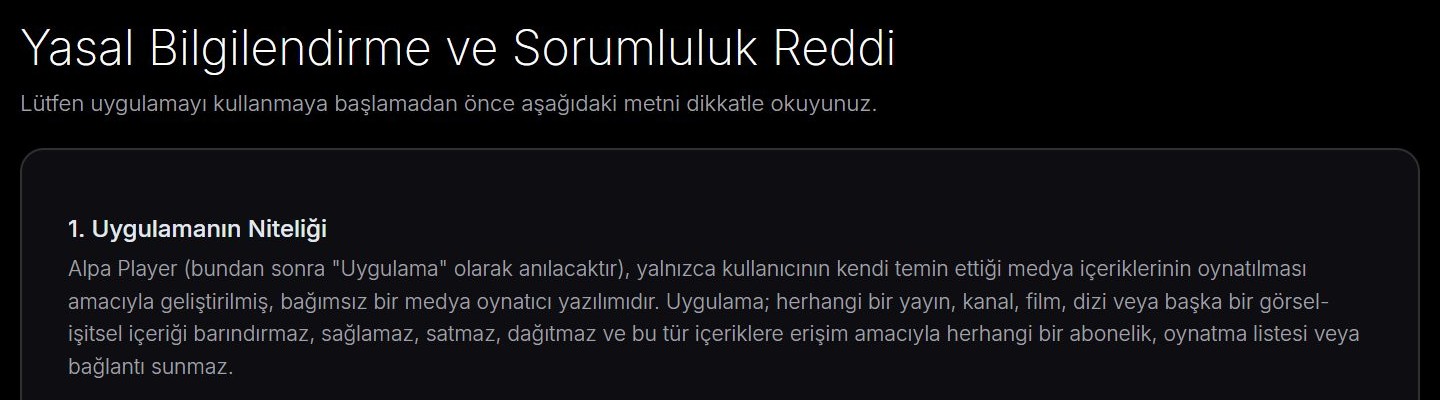
Before first use, the app shows a legal notice and asks the user to accept it. Addresses and passwords you add are stored encrypted with AES-256 in the device's secure storage, never shown on screen, and never sent to Alpa Yazılım. You will find a full description of the app in what is Alpa Player.
Does it matter whether the file is local or streamed?
For the player there is no difference, but the legal assessment depends on the nature of the source. The same player shows a video you filmed yourself and a stream arriving over the internet in exactly the same way. What matters is who owns that file or stream and whether they gave you the right to watch it.
For your own video, a film you bought, or an openly licensed work, that right is clear. For a stream whose provider is unknown and cannot show permission, the right is uncertain. So before adding a source to any player, ask yourself: "Do I have the right to watch this, and could I show it?"
Can a player developer check whether content is lawful?
A player developer cannot know or verify the license status of every source that users add on their own devices. That is why measures such as a legal notice, an acceptance step, logging, and the ability to restrict access after a violation are used to make responsibility clear.
These measures show that the developer is not acting as a content provider and that the user knows their responsibility. No measure removes the user's own legal responsibility, though, so making sure that a source is yours or that you have the right to use it remains your job.
Are uploads made through the website logged?
Yes. Every upload made through the remote playlist upload page is logged with the IP address and the MAC address, and the user who uploads is responsible. That way, the person adding a source never acts anonymously and knows they answer for it.
The process works like this. Typing long addresses with a TV remote is awkward, so the user enters the MAC address and the 6-digit key shown on the app's Add Source screen on the remote playlist upload page. They add the account or playlist address themselves and confirm a responsibility statement. The list then arrives on the TV, and the address and password are not shown in the app. The guide to uploading a playlist to your TV walks through the steps.
According to the legal notice, if Alpa Yazılım finds or is notified that Alpa Player is being used for unlawful content, it reserves the right to suspend or end the related institution account, license, and device access, and to cooperate with the competent authorities when necessary.
Who is responsible for content that institutions upload?
The institution is responsible for what it uploads to the panel. Schools, hospitals, hotels, municipalities, and similar organizations can apply for the free institution panel to give students and staff access to lecture and information videos, and they confirm that they have the right to publish that content. See a video platform for schools for the education side.
How can you use a player responsibly?
Responsible use comes down to two habits: add only sources you have the right to use, and get your apps from trustworthy places.
- Get the app from the developer's website or an official store; you can find Alpa Player in the download section.
- Make sure that what you add is something you bought, made yourself, or that carries an open license.
- Do not use a source whose owner is unknown or whose price is unrealistically low.
- For your own videos and openly licensed samples, read copyright and personal media.
If you would first like to try a player without any risk, the Alpa Player demo in your browser, which uses openly licensed samples, is a good starting point. This article is not legal advice; for a definite answer, read the actual laws and ask a lawyer.
Frequently asked questions
Is it legal to use a media player?
Yes. Player software is legal; apps such as VLC, Kodi, Plex, and Alpa Player show whatever source they are given. Legal responsibility begins with whether the content you play is licensed. This is not legal advice, so for special situations ask a lawyer.
Does Alpa Player provide content?
No. Alpa Player has no ready-made channels, films, series, or lists. Alpa Yazılım does not sell, host, or distribute content. Users add only sources they have the right to use, and the content comes to their device directly from the source they added.
Are remote uploads logged?
Yes. Every upload made through the website is logged with the IP address and the MAC address. The user enters the MAC address and key, adds their source, and confirms a responsibility statement; the uploading user is responsible for the lawfulness of that source.
Is an app with a ready-made channel list a player?
Such an app behaves more like a streaming service than a player and raises the question of content licensing. A real player starts empty and waits for you to add a source. The Alpa Player legal notice prohibits distributing the app with ready-made lists or advertising it as including channels or matches.
Can I watch my own videos with Alpa Player?
Yes. Videos you filmed yourself, content you bought, and openly licensed works are sources you have the right to use. The browser demo of Alpa Player also runs on openly licensed samples such as the Blender open movies.
How do I know whether a player app is safe?
Check that the developer's name, contact details, privacy policy, and legal notice are public. Download the app only from an official store or the developer's own site, and review the permissions it requests. Avoid apps that promise ready-made channels or come from anonymous sources.
Sources
Related articles
 Legal use
Is IPTV legal? Licensed vs unlicensed streaming
Is IPTV legal? The technology is; unlicensed content is not. Learn the difference, the risks, and the lawful ways to stream with Alpa Player.
 Legal use
Illegal streaming risks: legal, security, quality
Illegal streaming risks go beyond the law: malware, payment fraud, and data theft are real concerns. A calm, honest guide to what can go wrong.
 Legal use
Copyright and personal media: what you can play
Copyright and personal media explained: your own videos, purchased content, public domain, and Creative Commons works you can play with confidence.