
Is Your Media Player Safe? Permissions, Password Storage and Fake APKs
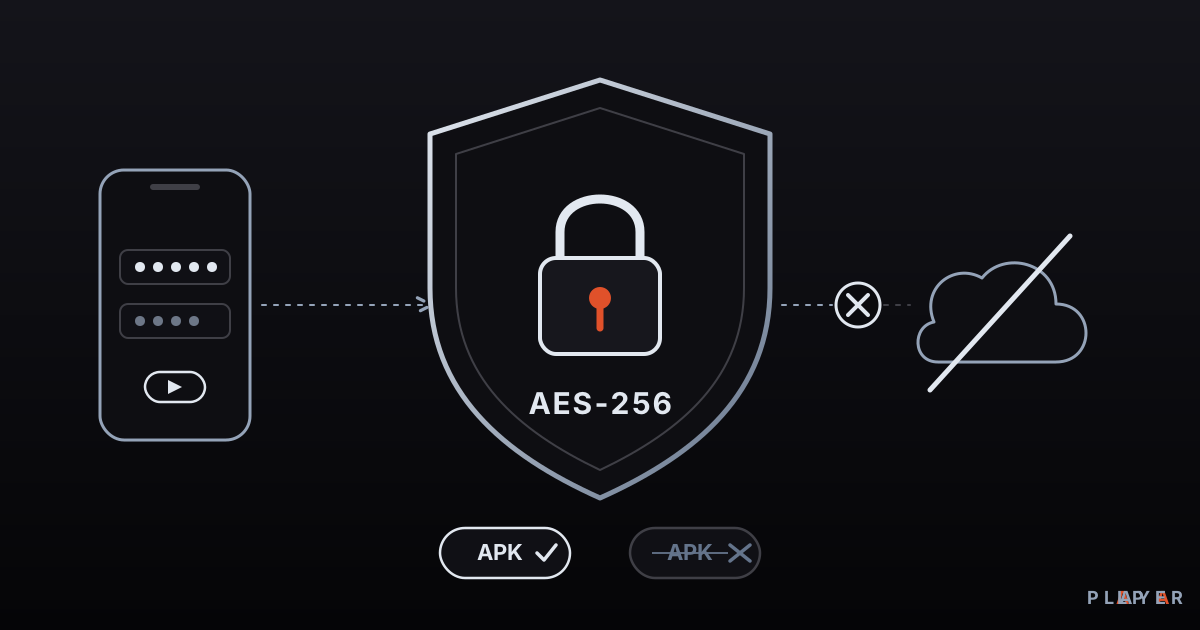
Short answer: A safe media player comes from an official source, is updated regularly, asks for no unnecessary permissions and stores your passwords encrypted. The risk lies less in the player type than in the source: fake APKs, tampered packages and plain-text password storage are the main dangers. Alpa Player keeps addresses and passwords encrypted with AES-256.
Key takeaways
- A media player's safety depends on its developer, download source, permissions, password storage and update habits, not on its price.
- A player basically needs network access and access to media files; question requests for contacts, SMS or microphone.
- Encrypted storage with AES-256 is far safer than leaving addresses and passwords as plain text, though it cannot help if the device itself is compromised.
- The way to avoid fake and tampered APK files is to download only from the official site or official store.
- Alpa Player stores the addresses and passwords you add in the device's secure storage with AES-256, never shows them on screen, and never sends them to Alpa Yazılım.
You do not just hand a media player video files. Often you also give it a playlist address, a server account from your provider, and a password. That information is sensitive, and if it lands in the wrong hands your account can be abused. So when people ask whether a media player is safe, the honest answer is never a plain yes or no; it depends on a few concrete things. This guide covers media player privacy: permissions, password storage, AES-256 encryption, fake APKs and everyday habits that keep you safe. If you want the fundamentals first, read what a media player is.
Is a media player safe, and what does it depend on?
A media player's safety depends on five concrete factors rather than on its price or popularity: who builds it, where you download it, which permissions it asks for, how it stores your data, and how often it is updated. The table shows the typical risk and the fix for each factor.
| Dimension | Typical risk | What to do |
|---|---|---|
| Developer | An anonymous publisher with no contact details | Check the developer's name, website and contact information |
| Download source | A tampered or fake package | Download only from the official site or official store |
| Permissions | Access to data unrelated to playback | Read the permissions and decline unnecessary ones |
| Data storage | Passwords stored as plain text | Choose an app that stores credentials encrypted |
| Updates | Unfixed security holes | Run the current version and avoid abandoned apps |
Players also parse unknown files and network data, so security flaws turn up from time to time, as they do in all media software. The fix is simple: keep your player updated.
Which permissions does a media player need?
A media player naturally needs only a few permissions: network access, access to media files, and sometimes notifications. Anything beyond that deserves a question. The table sorts reasonable requests from suspicious ones.
| Permission | Why it might be needed | Verdict |
|---|---|---|
| Internet access | To open network streams and playlists | Reasonable; on Android it is usually granted automatically at install |
| Access to media files (video, audio) | To play files stored on the device | Reasonable; granting it only when needed may be enough |
| Notifications | For playback controls | Reasonable and optional |
| Contacts, SMS, call log | No connection to playback | Suspicious; decline or pick another app |
| Microphone, camera, location | Not required for a player | Suspicious; look for a detailed reason |
| Device admin, accessibility | Not required for a player | Very suspicious; do not grant |
You can review permissions during installation and later in your device's app settings. If an app asks for access it cannot justify, treat that as a warning in itself.
How should your addresses and passwords be stored?
Your addresses and passwords should be stored encrypted, not as plain text, and should never be displayed on screen. A password kept as plain text can be read by anyone who gets access to the device. Encrypted storage greatly reduces that risk.
What is AES-256?
AES-256 is a symmetric encryption method that uses a 256-bit key. AES, the Advanced Encryption Standard, was published by the US standards body NIST in 2001 and works with 128-, 192- or 256-bit keys. Symmetric means the same key is used to encrypt and to decrypt. It is regarded as strong and is used in everything from banking to messaging.
Encryption is not a magic shield on its own, though. Know its limits.
- If the device itself is taken over by malware or unauthorized access, even encrypted data can be at risk.
- Encrypted storage does not help when you hand an address to someone else or share a screenshot.
- Where and how the key is kept matters; the best practice is to leave it to the device's secure storage.
The addresses themselves matter too. Some playlist links contain a username or token, such as https://example.com/playlist.m3u?token=abc123. A link like that is the key to your identity, so do not share it, screenshot it or send it to anyone. Plain http:// addresses travel across the network unencrypted, so prefer sources that use https:// when you can.
What is a fake APK, and how do you avoid one?
A fake APK is an Android package that carries a popular app's name and icon but has been tampered with. An APK is simply the installation file for an Android app. Someone can take the real app, add malicious code, and pass it off as an "updated", "unlocked" or "special" version. Packages like these can steal passwords, push unwanted ads, or put your device at risk.
Avoiding them is straightforward.
- Download only from official sources. Use the developer's own site or the official app store and nowhere else.
- Check the address. Look for look-alike spellings or extra words in the site name, and confirm the link starts with
https://. - Grant the unknown-source permission temporarily. On Android the "install unknown apps" permission is set per app; switch it off after installing.
- Keep device scanning on. Built-in scanning such as Google Play Protect can flag suspicious apps.
- Check permissions before you install. If a player wants contacts or SMS, stop.
Android adds a safeguard of its own: an update can only be installed over an app if it is signed by the same developer who signed the original. So a fake package cannot install as an update on top of the real app, but it can install as a separate app, and that is the real danger. For a safe step-by-step routine, read how to install an APK on Android TV.
How do you stay private and secure when streaming over a network?
For network streams, what matters most is how the address and password travel. A few situations call for extra care.
- Open Wi-Fi: On shared networks in cafes or hotels, unencrypted traffic can be seen by others. Avoid them for sensitive accounts.
- IP cameras: For RTSP cameras, change the default password and do not expose the camera directly to the internet. See what RTSP is and how to watch an IP camera.
- Shared accounts: Do not share your server account with others; you may be responsible for how it is used.
- Source legality: Services offering unlicensed content expose you to both legal and security risk. We cover this in the risks of pirate streaming.
What does Alpa Player do for privacy and security?
Alpa Player is a free media player developed by Alpa Yazılım, and it takes care to protect the addresses and passwords you add. Its known security features are these.
- Encrypted storage: Addresses and passwords you add are stored in the device's secure storage with AES-256.
- Hidden on screen: An address or password is not shown in the app.
- Not sent anywhere: This information is not sent to Alpa Yazılım.
- No account: There is no account, subscription or purchase, so you do not have to hand over account details.
- No content: The app has no ready-made channels, movies, shows or lists. Alpa Player is not a streaming service and only plays sources you have the right to use.
Remote upload was designed with safety in mind too. The Add Source screen in the app (labeled MAC on a TV) shows a MAC address and a 6-digit key. You enter them on the upload page from your phone or computer, add your source yourself and confirm the responsibility notice. Every upload is logged with the IP and MAC address, and the uploader is responsible for it, so do not share the 6-digit key with anyone. How the app handles data is explained in the privacy policy, and legal notices are on the legal notice page.
Download the Android APK and the Windows installer only from the official site. Google Play, Samsung, LG and Amazon store versions are in the publishing process; for the current status, see download Alpa Player for free. You can also get the Android APK or the Windows installer directly.
What is a safe media player checklist?
Staying safe comes down to eight small habits. The list applies to every player you install, not only Alpa Player.
- Download the player only from the official site or official store.
- Check the developer and the latest update date before installing.
- Read the requested permissions and decline those unrelated to playback.
- Turn on the unknown-source permission only for the duration of the install.
- Prefer apps that store passwords encrypted, and never reuse the same password elsewhere.
- Do not share playlist links, keys or screenshots that reveal them.
- Keep both the player and your device up to date.
- Play only licensed content you have the right to use.
For a feature-by-feature review, use the video player features checklist; to compare options, see best media player. What to watch for in free apps is covered in free video players. This article is not legal advice.
Frequently asked questions
Are media player apps safe?
Safety depends on the developer, download source, permissions, password storage and update habits, not on the type of player. A player that comes from an official source, is updated regularly, asks for no unnecessary permissions and stores passwords encrypted is generally safe.
What does AES-256 encryption do?
AES-256 is a strong method that encrypts data with a 256-bit key. Addresses and passwords stored this way cannot be read directly by someone who gets into the device. Alpa Player keeps the addresses and passwords you add encrypted with AES-256 in the device's secure storage, though it cannot do everything if the device itself is compromised.
Does Alpa Player send my passwords to a server?
No. The addresses and passwords you add are kept encrypted in the device's secure storage, are not shown on screen, and are not sent to Alpa Yazılım. For the full picture of how the app handles data, read the privacy policy.
How can I tell a fake APK?
There is no single sign, but there are warnings: it comes from somewhere other than the official site, the address uses look-alike spelling, it promises an "unlocked" or "special" version, or it asks for permissions unrelated to playback. If you are unsure, do not install it and go back to the official source.
Is the install unknown apps permission safe?
On Android this permission is set per app and only allows one specific app to install packages. The safe approach is to turn it on just for the install and switch it off afterward. Install only files you downloaded from an official source you trust.
What should I watch for when uploading a playlist to my TV?
Do not share the 6-digit key or the MAC address shown on your TV. Do the upload yourself, read the responsibility notice and add only sources you have the right to use. Every upload is logged with the IP and MAC address, and the uploader is responsible.
Sources
Related articles
 Media player guide
What Is a Media Player? How It Works
What is a media player and how does it turn files and streams into picture and sound? Learn how it works, the main types, and how to choose one.
 Media player guide
Best Media Player Apps: How to Choose
There is no single best media player. Compare VLC, Kodi, MX Player, Plex and Alpa Player by device, formats, cost and privacy, then pick your fit.
 Media player guide
Free Video Player: What "Free" Really Means
What does a free video player really cost? See how open source, ad-supported and freemium models differ, which hidden costs to expect, and how to choose safely.